The Ambrosia Guide / 0.1.0 PDF Manual ↗
Navigation
Choose navigation independently of flavor. auto keeps the flavor’s preset;
none removes structural navigation and releases its space.
#show: ambrosia-theme.with(
  flavor: "cambridge", palette: "ocean",
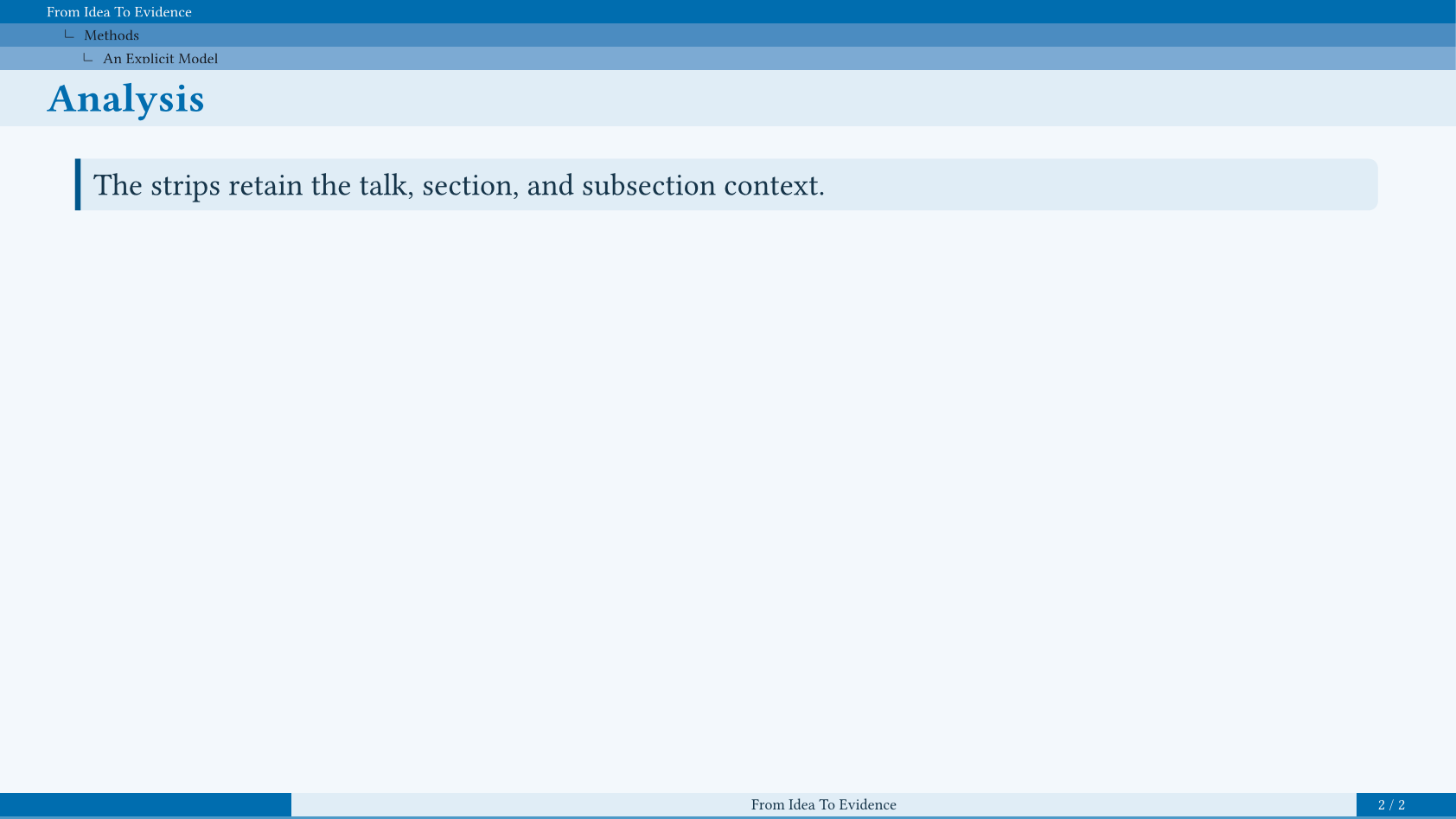
  navigation: "tree",
  config-common(new-section-slide-fn: none),
  config-info(title: [From Idea To Evidence]),
)
= Motivation
== A Shared Question
=== The Starting Point
Begin with the question that connects the talk.

= Methods
== An Explicit Model
=== Analysis
#ambrosia-block(style: "stripe")[
  The strips retain the talk, section,
  and subsection context.
]
Choose A Navigator
| Value | Arrangement |
|---|---|
"tabs" | Linked level-one section labels in the header. |
"dots" | Logical-slide dots grouped by section. |
"context" | Current section and subsection in a compact band. |
"tree" | Talk title and current ancestors in thin, indented strips. |
"panes" | Sections beside the current section’s children. |
"breadcrumbs" | Linked ancestor path in the slide-title slot. |
"sidebar" | A bounded outline in a reserved side column. |
"segments" | Section labels with local progress in a footer rail. |
Header bands, sidebars, and footer rails reserve their own space. Crowded views window around the current position with linked omission markers. Animation frames share one logical position; main talk and appendix have separate scopes.
#show: ambrosia-theme.with(navigation: "sidebar")
#slide(config: config-store(navigation: none))[A wider figure.]
Sidebar
| Option | Default / Effect |
|---|---|
navigation-side | "right"; also accepts "left". |
navigation-width | 9em, plus a 0.8em gap. |
navigation-depth | 2; maximum outline depth. |
sidebar-background | none; auto uses the flavor’s paint, or supply a solid color. |
Current entries and ancestors remain prominent. Long outlines collapse inactive
children, then window around the active entry. Special title, focus, image,
section, and ending slides hide the sidebar; a local
config-store(navigation: "sidebar") opts one back in. Agenda transitions keep it.
Trees, Panes, And Breadcrumbs
Tree strips show only the current path; panes also show neighboring choices.
A tree uses 0.75em per row by default. navigation-depth limits its ancestor
rows; a descriptor’s height can set an explicit budget. The talk row uses
short-title, falling back to the full title.
Panes reserve 2.7em, with independently windowed section/child lists.
Breadcrumbs reuse the ordinary title slot and retain explicit slide titles.
Long paths collapse intermediate ancestors and truncate long labels.
Section Rails And Progress
"tabs" and "segments" both show level-one sections. Segments add progress
within each section and use a 1.35em footer row. Move the same rail into the
header through a descriptor:
#let rail = ambrosia-navigation(base: "segments", placement: "header")
#show: ambrosia-theme.with(navigation: rail)
section-progress: true independently adds a small footer progress indicator.
progress-bar controls the global bar. The footer order is logo/buttons, then
segments, then metadata and progress.
Transparent Buttons
#show: ambrosia-theme.with(
  navigation-buttons: true,
  navigation-buttons-opacity: 35%,
  navigation-buttons-actions: ("previous", "section", "outline", "next"),
)
Actions are "first", "previous", "section", "outline", "next", and
"last". Unavailable targets are dimmed. Buttons share the compact footer logo
row; a custom footer uses the overlay fallback.
For manual placement, call ambrosia-navigation-buttons(actions: ..., opacity: 60%, fill: ...). It reserves no page margin. Handout, notes-only, and article
output suppress automatic navigation; second-screen notes keep it on the slide
half. Native PDF links require a viewer that supports following them.
Custom Descriptors
#let wide = ambrosia-navigation(base: "sidebar", name: "wide",
  side: "left", width: 10em, gap: 1em, depth: 3)
#show: ambrosia-theme.with(navigation: wide)
Descriptor keys include name, kind, placement, height, width, gap,
side, depth, and renderer. A custom renderer: self => content must fit
its declared region. Custom page headers/footers own their spacing; the
navigation-header-managed and navigation-footer-managed store flags opt
into automatic reservations.